Spatial Queries with SpatiaLite and Ruby on Rails
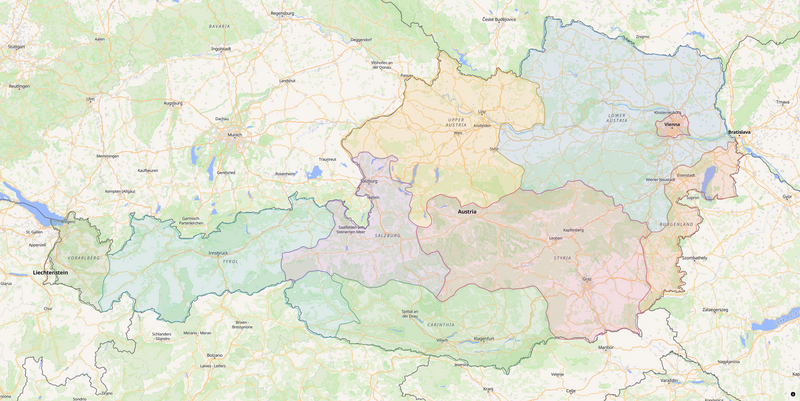
SpatiaLite is a great alternative to PostGIS/PostgreSQL if you want to stick to SQLite. Previously, we set up SpatiaLite in a simple demo application. To jog your memory, here’s what we’re building.
We already covered adding locations and rendering the map - the easy part. Now we’re about to get into the interesting part - polygon geometries, containment queries, and distance calculations. We’ll also dig into some unexpected snags you’ll hit running SpatiaLite in your Rails app. Let’s get to it.
You’re just here for the code? Okay. You can find the full spatialite-demo on GitHub.
Austrian States
To detect which state a location falls in, we need to store states somehow. For our purposes, states are simple boundaries stored as actual geometries. Each state has a name and a short code, AT1 through AT9. Let’s generate the model.
rails generate model State code:string:uniq name:string geometry:blob
Areas such as states can be represented as GeoJSON features with polygon geometry. A polygon is just a list of coordinates describing the boundary ring.
{
  "type": "FeatureCollection",
  "features": [
    {
      "type": "Feature",
      "geometry": {
        "type": "Polygon",
        "coordinates": [
          [
            [14.691140440482174, 48.58653497825477],
            [14.69344973389088, 48.5835463854271],
            // ...
          ]
        ]
      },
      "properties": {
        "source": "https://simplemaps.com",
        "id": "AT3",
        "name": "Niederösterreich"
      }
    },
    // ...
  ]
}
Obviously, we’re not going to trace those polygons by hand. Instead, we’ll use an existing dataset. You can find these on Statistik Austria or Simplemaps. We’ll use a dataset from the latter site - let’s load it in our seed file via our model. We’re using GeomFromGeoJSON to transform the GeoJSON data into a valid SpatiaLite geometry.
class State < ApplicationRecord
  attr_accessor :geometry_json

  after_save :update_geometry

  private

  def update_geometry
    self.class.connection.execute(
      self.class.sanitize_sql_array([
        "UPDATE states SET geometry = SetSRID(GeomFromGeoJSON(?), 4326) WHERE id = ?",
        geometry_json, id
      ])
    )
  end
end
# db/seeds.rb
geojson_path = Rails.root.join("db/seeds/at.json")
collection = JSON.parse(File.read(geojson_path))

collection["features"].each do |feature|
  props = feature["properties"]

  state = State.find_or_initialize_by(code: props["id"])
  state.name = props["name"]
  state.geometry_json = feature["geometry"].to_json
  state.save!
end
Once the states and their geometry are stored in the database, it’s time to render them. We’re using the same pattern we previously used for Location - SpatiaLite generates valid GeoJSON and we render it using MapLibre and a simple Stimulus controller.
# app/models/state.rb
def to_geojson
  geojson_str = self.class.connection.select_value(
    "SELECT AsGeoJSON(geometry) FROM states WHERE id = #{id}"
  )

  {
    type: "Feature",
    geometry: JSON.parse(geojson_str),
    properties: { code: code, name: name }
  }
end

def self.to_feature_collection
  {
    type: "FeatureCollection",
    features: all.map(&:to_geojson)
  }
end
<%# app/views/locations/index.html.erb %>
<div
  class="relative w-full h-screen"
  data-controller="map location-form"
  data-map-locations-value="<%= @locations_geojson %>"
  data-action="map:click->location-form#open"
  data-map-states-value="<%= @states_geojson %>"
>
To make things look nice we’ll color each polygon. MapLibre has a thing called match expressions - a data-driven style expression that maps a feature property - in our case the state code - to a paint value. Here’s how that looks.
const STATE_COLOR_EXPRESSION = [
  "match",
  ["get", "code"],
  "AT1", "#e07b54", // Burgenland
  "AT2", "#6db56d", // Kärnten
  "AT3", "#5b9bd5", // Niederösterreich
  "AT4", "#e8a838", // Oberösterreich
  "AT5", "#9b6bbf", // Salzburg
  "AT6", "#d45f8a", // Steiermark
  "AT7", "#4bb8b8", // Tirol
  "AT8", "#7a9e5a", // Vorarlberg
  "AT9", "#e05c5c", // Wien
  "#aaaaaa", // fallback
];
Now all that’s left is to add a source and two layers - one for the fill color and one for the outline.
#addStates() {
  this.map.addSource("states", {
    type: "geojson",
    data: this.statesValue,
  });

  this.map.addLayer({
    id: "states-fill",
    type: "fill",
    source: "states",
    paint: {
      "fill-color": STATE_COLOR_EXPRESSION,
      "fill-opacity": 0.15,
    },
  });

  this.map.addLayer({
    id: "states-outline",
    type: "line",
    source: "states",
    paint: {
      "line-color": STATE_COLOR_EXPRESSION,
      "line-width": 2,
      "line-opacity": 0.8,
    },
  });
}
At this point the map shows color-coded state polygons.
Which State Does a Point Belong To?
Now that we have states with boundaries, we can ask which one contains a given point. SpatiaLite got you covered with the Contains function.
# app/models/location.rb
def containing_state
  State.find_by_sql([
    <<~SQL,
      SELECT *
      FROM states
      WHERE Contains(geometry, SetSRID(MakePoint(:longitude, :latitude), 4326))
      LIMIT 1
    SQL
    { longitude: longitude.to_f, latitude: latitude.to_f }
  ]).first
end
We convert longitude and latitude to valid geometry using MakePoint and SetSRID. SetSRID (Spatial Reference System Identifier) is required as it tells SpatiaLite what reference system to use. We’re using WGS 84 - the standard GPS coordinate system where values are longitude/latitude in degrees.
Contains checks whether one geometry contains another. Here, that gives us a point-in-polygon query in one line of SQL. Marvelous, isn’t it?
In the UI, we attach the containing state’s name and code to each location’s GeoJSON properties and render the info in a popup.
# app/models/location.rb
def to_geojson
  geojson_str = self.class.connection.select_value(
    "SELECT AsGeoJSON(geometry) FROM locations WHERE id = #{id}"
  )

  {
    type: "Feature",
    geometry: JSON.parse(geojson_str),
    properties: {
      name: name,
      latitude: format("%.6f", latitude),
      longitude: format("%.6f", longitude),
      state_name: containing_state&.name,
      state_code: containing_state&.code,
    }
  }
end
#showPopup(feature) {
  const props = feature.properties;
  const stateInfo = props.state_name ?? "Outside Austria";

  new maplibregl.Popup({ className: "location-popup", closeButton: false })
    .setLngLat(feature.geometry.coordinates.slice())
    .setHTML(
      `<div>
        <p>${props.name}</p>
        <p>${props.latitude}, ${props.longitude}</p>
        <p>${stateInfo}</p>
      </div>`,
    )
    .addTo(this.map);
}
Going the Distance
Now for our last trick - calculating the center of a state and its distance to a given location. The centroid part is easy enough. SpatiaLite ships a Centroid function, so we let the model calculate it and pass the result to the Stimulus controller. That controller in turn renders another GeoJSON layer with some colored dots onto our map.
# app/models/state.rb
def centroid
  self.class
    .where(id:)
    .pick(Arel.sql("X(Centroid(geometry))"), Arel.sql("Y(Centroid(geometry))"))
    .map(&:to_f)
end
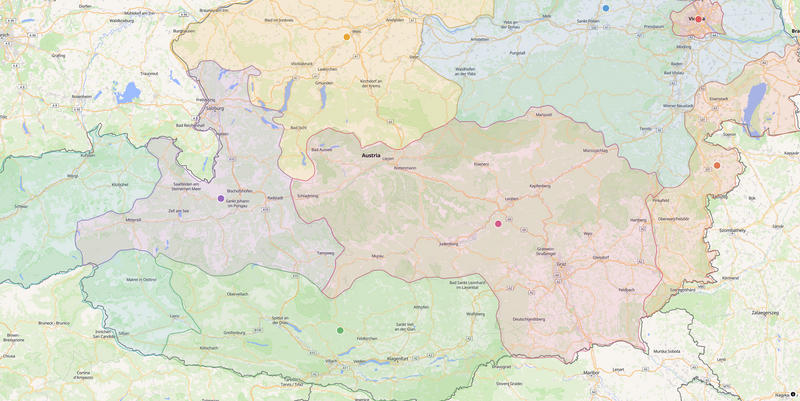
Calculating the distance from a location to that centroid should be equally simple, right?
# app/models/location.rb
def distance_to_state_centroid
  sql = self.class.sanitize_sql_array([
    <<~SQL,
      SELECT Distance(Centroid(geometry), SetSRID(MakePoint(:longitude, :latitude), 4326), 1)
      FROM states
      WHERE Contains(geometry, SetSRID(MakePoint(:longitude, :latitude), 4326))
      LIMIT 1
    SQL
    { longitude: longitude.to_f, latitude: latitude.to_f }
  ])

  self.class.connection.select_value(sql)&.to_f
end
Not quite. Running location.distance_to_state_centroid spits out a couple of cryptic error messages.
unknown SRID: 4326	<no such table: spatial_ref_sys>
unknown SRID: 4326	<no such table: gpkg_spatial_ref_sys>
Here’s the issue. Distance has multiple modes. With just two arguments it computes a planar distance in the coordinate system’s native units. For WGS84 coordinates that would mean degrees, which is not what we need. Passing 1 as the third argument switches to geodesic distance, which gives us meters for longitude/latitude data.
That geodesic mode depends on SpatiaLite’s metadata tables. In particular, it needs spatial_ref_sys so it can look up the ellipsoid parameters for SRID 4326. On a fresh SQLite database those tables do not exist until you run InitSpatialMetadata(1). If you skip that step, Distance(..., 1) fails with errors like these and returns NULL.
So let’s just initialize SpatiaLite’s metadata tables.
Location.first.distance_to_state_centroid
# unknown SRID: 4326	<no such table: spatial_ref_sys>
# unknown SRID: 4326	<no such table: gpkg_spatial_ref_sys>
# => nil

ActiveRecord::Base.connection.execute("SELECT InitSpatialMetadata(1)")
# => [{"InitSpatialMetadata(1) /*application='SpatialiteDemo'*/" => 1}]

Location.first.distance_to_state_centroid
# => 26980.4534003919
Of course, we don’t want to run that every time we need to run a distance query. Let’s wrap it in a rake task and use the little-known enhance method so Rails initializes the metadata every time it creates a database.
# lib/active_record/spatialite.rb
module ActiveRecord
  module Spatialite
    def self.init(connection = ActiveRecord::Base.connection)
      count = connection.select_value("SELECT COUNT(*) FROM spatial_ref_sys").to_i
      return if count > 0

      connection.execute("SELECT InitSpatialMetadata(1)")
    rescue ActiveRecord::StatementInvalid
      connection.execute("SELECT InitSpatialMetadata(1)")
    end
  end
end
# lib/tasks/spatialite.rake
namespace :db do
  Rake::Task["db:create"].enhance do
    Rake::Task["spatialite:init"].invoke
  end
end

namespace :spatialite do
  desc "Initialize SpatiaLite spatial metadata for the current environment database"
  task init: :environment do
    ActiveRecord::Base.establish_connection
    require "active_record/spatialite"
    ActiveRecord::Spatialite.init
    puts "SpatiaLite spatial metadata initialized."
  rescue => e
    puts "SpatiaLite init skipped: #{e.message}"
  end
end
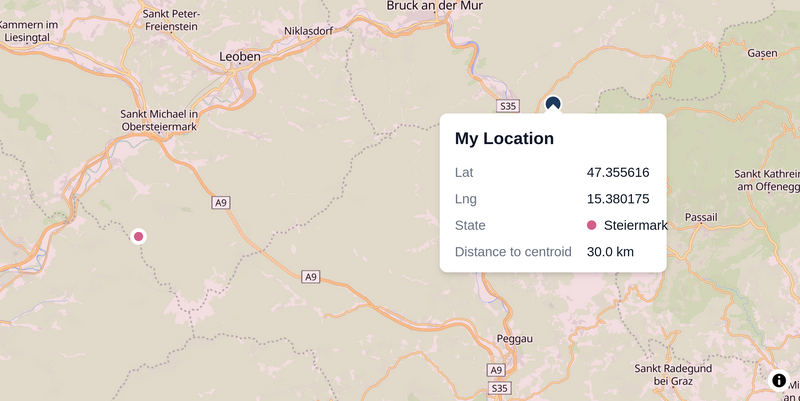
With those fixes in place, we can use distance_to_state_centroid reliably and display the distance of each location to its state’s center.
Taming SpatiaLite
Finally, our demo application works. Or does it?
Not so fast. Before you ship any of this, there are a few things to sort out. As I’ve alluded to in the first part, using SpatiaLite with Rails is pretty fringe. And as is common when working with fringy stuff, you’ll hit snags in unexpected places.
Here’s one. The next time you run a migration, you’ll get hit with a wall of text in schema.rb.
ActiveRecord::Schema[8.1].define(version: 2026_04_07_101329) do
  # ...
  create_table "geometry_columns", primary_key: ["f_table_name", "f_geometry_column"], force: :cascade do |t|
    t.integer "coord_dimension", null: false
    t.text "f_geometry_column", null: false
    t.text "f_table_name", null: false
    t.integer "geometry_type", null: false
    t.integer "spatial_index_enabled", null: false
    t.integer "srid", null: false
    t.index ["srid"], name: "idx_srid_geocols"
    t.check_constraint "spatial_index_enabled IN (0,1,2)", name: "ck_gc_rtree"
  end

  create_table "geometry_columns_auth", primary_key: ["f_table_name", "f_geometry_column"], force: :cascade do |t|
    t.text "f_geometry_column", null: false
    t.text "f_table_name", null: false
    t.integer "hidden", null: false
    t.integer "read_only", null: false
    t.check_constraint "hidden IN (0,1)", name: "ck_gc_hidden"
    t.check_constraint "read_only IN (0,1)", name: "ck_gc_ronly"
  end

  # ...
What’s all this? Well, these are the tables SpatiaLite creates when you initialize its metadata. Obviously, we don’t want those cluttering up the application schema. To avoid this, we need to tell Rails schema dumper to ignore SpatiaLite’s internal tables.
# config/initializers/spatialite.rb
SPATIALITE_TABLES = %w[
  geometry_columns
  geometry_columns_auth
  geometry_columns_field_infos
  geometry_columns_statistics
  geometry_columns_time
  views_geometry_columns
  views_geometry_columns_auth
  views_geometry_columns_field_infos
  views_geometry_columns_statistics
  virts_geometry_columns
  virts_geometry_columns_auth
  virts_geometry_columns_field_infos
  virts_geometry_columns_statistics
  spatial_ref_sys
  spatial_ref_sys_aux
  spatialite_history
  sql_statements_log
  data_licenses
  ElementaryGeometries
  KNN2
  SpatialIndex
].freeze

SPATIALITE_TABLE_REGEX = /^idx_\w+_\w+$/

ActiveSupport.on_load(:active_record_sqlite3adapter) do
  ignore_tables = ::ActiveRecord::SchemaDumper.ignore_tables
  SPATIALITE_TABLES.each { |t| ignore_tables << t }
  ignore_tables << SPATIALITE_TABLE_REGEX
  ignore_tables.uniq!
end
On current Rails versions, that just works. If you were unlucky enough to try this a bit earlier - as I was - the wall of text in schema.rb was the least of your problems. The schema dumper could crash on SpatiaLite’s virtual tables. I filed #56969 and #56976, so now both of these issues are fixed in Rails 8.1.3. Yay. If you are on an earlier version of Rails, you’ll have to monkey-patch in those fixes.
I included the monkey patches in the demo app. You can find them here.
So that’s the schema dumper. You know another unexpected place where SpatiaLite metadata tables become a problem? Tests.
We’re responsible adults, so of course we test the things we just built. Let’s keep it simple and write tests for the centroid and distance-to-state methods.
# test/models/state_test.rb
require "test_helper"

class StateTest < ActiveSupport::TestCase
  test "centroid returns centroid within the polygon" do
    state = State.create!(
      code: "S1",
      name: "State",
      geometry_json: {
        type: "Polygon",
        coordinates: [[[0, 0], [1, 0], [1, 1], [0, 1], [0, 0]]]
      }.to_json
    )

    assert_equal([0.5, 0.5], state.centroid)
  end
end
# test/models/location_test.rb
require "test_helper"

class LocationTest < ActiveSupport::TestCase
  setup do
    State.create!(
      code: "S1",
      name: "State",
      geometry_json: {
        type: "Polygon",
        coordinates: [[[0, 0], [1, 0], [1, 1], [0, 1], [0, 0]]]
      }.to_json
    )
  end

  test "distance_to_state_centroid returns a positive value for a point inside the state" do
    location = Location.create!(name: "Inside", latitude: 0.25, longitude: 0.75)

    distance = location.distance_to_state_centroid

    assert distance > 0
  end

  test "distance_to_state_centroid returns nil for a point outside state" do
    location = Location.create!(name: "Outside", latitude: 10.0, longitude: 10.0)

    assert_nil location.distance_to_state_centroid
  end
end
If you run your tests now, you’re in for another nasty surprise.
$ rails test
unknown SRID: 4326	<no such table: spatial_ref_sys>
unknown SRID: 4326	<no such table: gpkg_spatial_ref_sys>

Error:
LocationTest#test_distance_to_state_centroid_returns_a_positive_value_for_a_point_inside_the_state:
NoMethodError: undefined method '>' for nil
    test/models/location_test.rb:14:in 'block in <class:LocationTest>'
Weird, didn’t we already fix this? Yup, we did - but not for tests. Because SpatiaLite metadata is not part of the regular Rails schema, the test database is missing the metadata tables too. That’s easy enough to fix by extending the existing rake task.
namespace :db do
  namespace :test do
    Rake::Task["db:test:prepare"].enhance do
      Rake::Task["spatialite:init_test"].invoke
    end
  end
end

namespace :spatialite do
  desc "Initialize SpatiaLite spatial metadata for the test database"
  task init_test: :environment do
    ActiveRecord::Base.establish_connection(:test)
    require "active_record/spatialite"
    ActiveRecord::Spatialite.init
    puts "SpatiaLite spatial metadata initialized for test database."
  rescue => e
    puts "SpatiaLite init_test skipped: #{e.message}"
  end
end
Let’s also make sure parallel tests work. We like our tests speedy, right? I mean, we only have three right now, but let’s force parallel tests on immediately - for science.
# config/environments/test.rb
Rails.application.configure do
  # ...
  config.active_support.test_parallelization_threshold = 1
end
$ rails test
Running 3 tests in parallel using 12 processes
# Running:

unknown SRID: 4326	<no such table: spatial_ref_sys>
unknown SRID: 4326	<no such table: gpkg_spatial_ref_sys>

Error:
LocationTest#test_distance_to_state_centroid_returns_a_positive_value_for_a_point_inside_the_state:
NoMethodError: undefined method '>' for nil
    test/models/location_test.rb:14:in 'block in <class:LocationTest>'
What now? Parallel workers introduce another subtle problem. Rails spins up one database per worker, but those workers do not use the primary test database. Instead, Rails initializes fresh databases from your schema. That means the worker databases start out without spatial_ref_sys, so Distance(..., 1) returns NULL once again.
Fun fact, Rails only enables parallel tests once you cross the default threshold of 50 tests. Below that, everything looks fine. Non-parallel tests use your default test database, which has spatial metadata. Then one day you add test number 50 and suddenly your tests break.
Anyways, to fix this, each parallel worker needs to properly initialize SpatiaLite metadata tables.
# test/test_helper.rb
parallelize_setup do |_worker|
  ActiveRecord::Spatialite.init
end
Unfortunately, that alone is not enough. Parallel workers also truncate database tables between runs, which wipes spatial_ref_sys clean. That’s why we wrote ActiveRecord::Spatialite.init to check the row count first and re-initialize when needed. But we should also stop Rails from wiping those tables in the first place. Let’s patch truncate_tables.
# config/initializers/spatialite.rb

# Protect spatial_ref_sys (and other SpatiaLite system tables) from being
# emptied when Rails parallel test workers call truncate_tables to reset state.
# Without this guard, geodesic Distance(..., 1) returns NULL because the SRID
# rows are wiped between worker resets.
ActiveSupport.on_load(:active_record) do
  require "active_record/connection_adapters/abstract/database_statements"

  ActiveRecord::ConnectionAdapters::DatabaseStatements.prepend(Module.new do
    def truncate_tables(*table_names)
      safe_names = table_names.reject do |name|
        SPATIALITE_TABLES.include?(name) || name.match?(SPATIALITE_TABLE_REGEX)
      end
      super(*safe_names)
    end
  end)
end
With all that in place, parallel tests work too. Which means we finally have a SpatiaLite setup that behaves like you would expect.
Wrapping Up
That’s the payoff for part one’s setup work. Contains for point-in-polygon, Centroid for center points, and Distance(..., 1) for geodesic distances - all expressed as SQL, all running inside SQLite. And all of that with only some minor issues that we’ve been able to work around. You can find the full demo code on GitHub.
SpatiaLite is still PostGIS’s slightly eccentric cousin. But for a Rails app, having proper spatial queries in a single SQLite file is pretty great.